
Procedure Catalogs
Procedure Catalogs are an efficient, consistent way to enter multiple charges with a single fee code selection.
Setup
Think of a procedure catalog as a group of charges that you enter often. An example could be your standard treatment combination for a new patient which might include xrays, and evaluation, and an adjustment. Or it might include 2 therapies and an adjustment for a regular visit.
Procedure catalogs are billed just as you would select an individual fee code: from the charges menu, CPT code selection. And clicking on the pick list icon is where we setup the catalog. Here are the steps involved to setup a catalog.
Add a new fee code. Start as you would for any single code fee.
Check the box for “Catalog”. You will notice that most of the other fields on the screen will become inactive. The only active entry fields are: Quickcode, Code, Description, Order Number, and the Procedure Catalog button in the lower left hand corner.
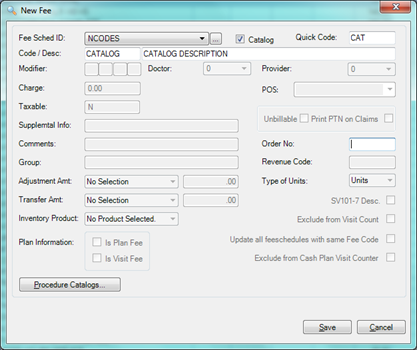
Go ahead and enter the QuickCode, Code and Description. And click Save to keep your basic construction of the catalog, then Edit it to continue constructing your catalog.
Select the fees to include in your catalogs. To do this, click on the Procedure Catalogs button. In our example below, we’ve selected e procedures: an xray, an extended office visit and a manipulative treatment (does not show on selection screen below) for a new patient. Just click in the box in the first column to select it.

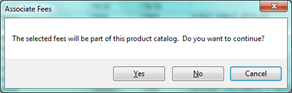
When you have finished checking the fees you want in your catalog, click the Select button. You’ll receive the following confirmation. If you’re happy with your selection, click “Yes”.
Finally, click “Save” and your new procedure catalog is ready for use. Do not be surprised when you see that the catalog has a fee of $0.00. It’s the charges within the catalog that have the actual billing associated.
Using your new procedure catalogs.
Select your new catalog code, the same as you would an individual fee code. Here is an example of what you’ll see when you post the catalog charge that included these fee codes:

Notice that all 3 charges – the xray, the exam and the adjustment - are posted for the same date and for the dollar-amounts associated with those individual charges.
|
The complete profile of the embedded charges in the catalog will be applied. For example:
- If you have embedded adjustments or transfers, those items will be posted and you can expect to see the tooltip: “new Adjustments/transfers automatically added”.
- If a charge in the catalog has tax associated with it, the tax will be billed at the time you post the catalog.
- If you change the price of any individual fee code that is part of the catalog, any future entries of the catalog will contain the new prices.
- Anything you do to the structure of the catalog AFTER posting its charges to an account will not affect previously entered charges.
It is not working
|
Troubleshooting |
|
|
I tried to enter the total charge for the catalog and it won’t let me enter the $ amount on the catalog. |
That’s correct. The catalog itself has no dollar value. It’s the charges within the catalog that hold the dollar amounts. |
|
I picked the wrong catalog that had an extra charge in it. How can I correct that? |
Once you’ve posted the catalog, you can do anything you want to do with the individual charges, including deleting those that you didn’t mean to post. |
|
Something popped up briefly when I posted the catalog that said that transfers and adjustments have been posted. Where did that come from? |
One or more of the charges in your catalog must have transfers or adjustment associated with it. To correct, you can go to the payments window and delete any that you don’t want. You should also review the charges in the catalog to make sure that you’ve selected the proper ones.
|
|
I just added a charge to a catalog but the charges that I entered with it before didn’t change. Why not? |
That’s correct. Changes that you make in a catalog today will not affect those charges that you entered yesterday.
|
|
I just cloned my fee schedule that contains a catalog and it doesn’t work when I use it in the new fee schedule. |
Yes, that can happen, and when it does, you’ll probably see a charge of $0.00 for a FEE CATALOG. After you clone a fee schedule with a catalog, you MUST edit and re-select the fees to associate with the new catalog. |
JK 12/15/16 -- BH 4/7/17--NSM 11/22/2019
0 Comments