
Interest Billing
The Practice Management System includes user-controlled interest billing on patient balances that are delinquent. This section will review definitions, setup and pro’s and con’s of interest billing.
The basics of billing interest
When you decide to bill interest on past due balances, you will have a number of choices to make. It’s because we provide such flexibility that you’ll be able to tailor your interest billing to exactly what you need. Here’s a brief list of the decisions you will need to make.
- Do you want to bill interest?
- Which individual patients should be billed interest?
- What do you consider a delinquent balance?
- Do you want to bill on just patient balances or on their total patient and insurance balance?
- What annual interest rate will you use?
- Are there low balances that you want to exclude from interest billing?
- Is there a minimum $ amount that you want to charge?
- Will you be compounding interest?
Let’s explore each of these items and how you control them.
Do you want to bill interest? If yes, then you’ve got to enable the feature first, otherwise the feature is not activated. You can enable this from your Settings / Ledger options page. Simply check the box that says: Enable Delinquent Account Interest Accrual. Doing this simply means that you’ve turned on this feature for all of your patients. It does not mean that interest will be billed for any of your patients until you’ve set up your interest billing profile.
Which individual patients should NOT be billed interest? By default, all patients who meet your criteria for “delinquent” will be billed interest once you set up your profile and tell the system to bill interest. However, we recognize that you may NOT want to bill interest to every patient. Some individuals or groups to consider are hardship cases, and personal injury cases where you receive payment at the time of patient discharge.
How to exclude individual patients. We suggest that you run your Aging report to determine if there are any patients that you want to exclude from interest billing.
After you’ve identified the accounts you want to exclude, open your patient record, then click on the Cases tab. In the bottom center you’ll see a checkbox as shown here. Simply check the box to exclude that case from being billed interest.

Former Legacy AS/PC customers: if you have converted from Legacy AS/PC, we can help you select which customers to bill or not bill. Please contact technical support for help with this.
Special Note: Exclusion from interest billing is done on a case by case basis. This means that if a patient has a standard maintenance plan as well as a personal injury case, you may INCLUDE one case and EXCLUDE the other case. Just check the box on the case that you DON’T want to bill interest.
At this point, you’ve established that you want to bill interest and identified accounts that you want to include/exclude. Remaining items are all controlled by the Monthly Interest options. Go to the Tasks / Bill Monthly Interest menu now. Each item is explored in detail on the following pages.
Setup
The form below is your monthly interest billing profile page.
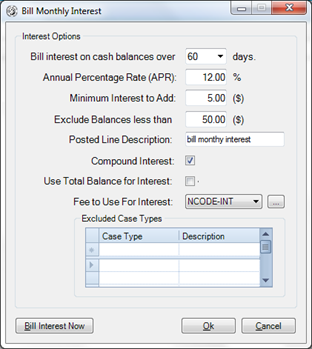
“Bill interest on cash balances over ________ days”. We provide a drop down selection for standard ranges like 30, 60, 90, 120 days, but you are free to enter any number of days you wish. Remember that this will be billed on only the PATIENT portion of the balance that is older than your specified number of days. AND, unapplied patient payments will be applied to any outstanding patient balances that are older than your selected date first. If you wish to bill on the total of the patient and the insurance balance, please see below for the checkbox “Use Total Balance for Interest”
“Annual Percentage Rate (APR) _____%” This is your ANNUAL percentage rate that you are charging. Many states have usury laws that limit the interest rate you may charge, so we advise that you check with your accountant for an appropriate rate to use. Although this indicates the annual rate charged, you will only be billing the patient for one month’s worth of interest. For example:
Patient portion past due balance = $1000.00
Annual Percentage Rate = 12%.
Annual Interest = $120.00
Monthly interest charged = $10.00
“Minimum Interest to add” – Re-billing patients is expensive, and for that reason, it’s unrealistic to charge interest of something like $0.35. The stamp costs more than the interest you’re billing in that case. Some providers, prefer to bill a minimum “service charge” of $2.00 or $5.00 or some other specified amount. If you have such a minimum amount, you should enter it here.
“Exclude Balances Less than $_______”. Some patients will have relatively small balances and you may wish to exclude them from being billed interest. Part of your decision about what level to set should include your cost of printing, stuffing and mailing a statement. Current estimates are that it costs at least $1.10 to mail every statement.
“Posted Line Description” – Your system will generate a message with each interest line that will appear as “Interest billed (APR%); past due over XX days;” and then whatever other message you may wish to enter in this box.
“Compound Interest”checkbox. Checking this box may find you billing interest on previous unpaid interest charges. If you do not wish to charge compound interest, then leave this box un-checked.
“Use Total Balance for Interest” checkbox. If you check this box, your interest calculation will be based upon BOTH the patient and the Insurance portion that is delinquent. Leaving it blank bills only on the patient portion that is past due.
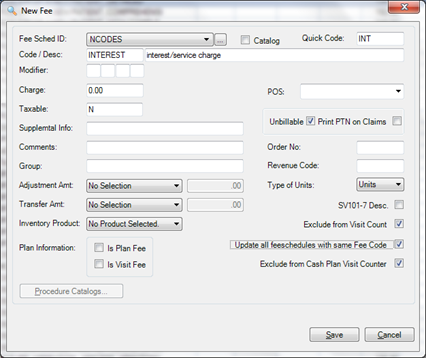
“Fee to Use For Interest” . Just like all items billed, you will need to set up a fee code. Here’s an example of what your interest billing fee code should look like:
“Excluded Case Types”. If you happen to have a Case Type of something like “Hardship”, or “Personal Injury”, you may wish to exclude these entire case types from posting interest on aged balances. If so, here’s your chance to exclude them. Remember that this table specifies those case types that will NOT be billed interest.
Now that you’ve identified which cases should/should not be billed interest and you’ve set up how you want interest to be calculated, it’s time to “Bill Interest Now”. Go ahead and select it now. Don’t worry, if you change your mind and don’t want to run, you can still suspend any interest billing.
The next thing you’ll see is the pre-processing report which lists patient information, their past due balances and the amount of interest that they will be charged. At this point, you can”
- Exclude individual patients by de-selecting them in the grid;
- Preview /Print the pre-processing report for review.
If this is your first time doing interest billing, we suggest that you only print the report, then click Cancel so that interest isn’t actually billed. Now is a good time to review what interest is about to be billed, exclude any additional cases, and consider adjusting your minimum service charge and/or balance threshold.
Once you are satisfied with your selections, proceed back thru Tasks / Bill Monthly Interest / Bill Interest Now . When you get to the pre-processing report, click OK and then continue to post interest.
It is not working
|
Troubleshooting |
Check this: |
|
What interest rate should I use for billing? |
Sorry, but that’s not a question we can answer. Many states have specific usury laws when it comes to interest or service charge. You should contact your accountant or trade association for information on that |
|
It’s billing our minimum of $5.00 on patients that only have a $2.00 balance. How can I exclude them? |
Under “Tasks/Bill Monthly Interest”, specify the minimum balance that you want to use for billing.
|
|
One of my patients has 2 cases and I only want to bill interest on ONE of them. How do I do that? |
It’s easy. Remember that interest is not billed on an Account! It’s billed on the Case. So, you can control your inclusion/exclusion from the patient CASES tab.
|
|
There are 2 patients who just recently lost their jobs. We know we’ll eventually get paid, but want to exclude them from being billed interest. |
We’re glad you asked. At the bottom of the patient’s cases’ tab, you’ll find a checkbox labeled: “Don’t Bill Past Due Interest.” Just put a checkmark in that box and they will be excluded from interest billing. Later removal of the checkmark will include them in the next cycle of interest billing. |
|
I accidentally billed interest yesterday and didn’t realize I was doing it. Now I’ve got hundreds of service charges I need to delete. How do I do that? |
Not to worry. Our staff of support technicians can help you Just give us a call and we’ll be glad to help. |
JK 3/6/17 -- NM 4/19/17
All patients are automatically excluded on the Cases tab of the Patient chart when you Enable Delinquent Account Interest Accrual via the Settings / Ledger options page. If you want all of your patients enabled tech support can assist you. Otherwise you can choose your delinquent accounts individually.