
EHR has the capability to Copy and Paste visits on the Patient Summary Screen. This can save lots of time but you need to be aware of how it works.
- Copy/Paste a visit from a previous date to today:
a. Create a new visit for today if it wasn’t already created by checking in the patient and opening the chart. Otherwise, you might accidentally over-write the previous note.
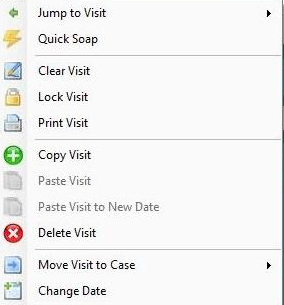
b. Right click the new visit and select Clear Visit from the menu options.
This will prompt you to enter the staff password, which is “staff”, unless you changed it.
c. Right click on the visit to copy FROM and select Copy Visit.
d. Right click on the cleared visit and select Paste Visit.
2. Insert a visit to a new date:
a. Right click the visit to copy FROM.
b. Right click on any visit and select Paste Visit to New Date. Select the date to insert the visit.
3. If the patient has multiple cases on their chart, you can move the visit to another case.
a. Right click the visit you wish to move and select Move Visit to Case.
b. Select the case where the visit belongs.
c. Note: It does not keep a copy of the note in both cases.
4. You can also copy notes between patients.
For example, if you opened John Chiro’s chart and entered all your notes, then realized you meant to be in Jane Chiro’s chart, you can follow these steps:
a. Open John’s chart and right click and Copy Visit.
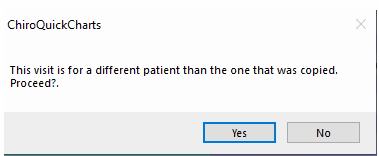
b. Open Jane’s chart, create a new visit, clear the visit, and paste the visit. You will get a warning. If you are sure you are in the correct chart, click Yes to proceed.
c. Go back to John’s chart, right click and Delete the visit, which will also require the staff password.
0 Comments