
The PM is able to estimate the Patient’s Due Today amount more accurately. It is estimated using combinations of deductible, fixed copay, copay percentage, any patient-based charges for the day, and previous patient balance. We use checkboxes to control which of these elements are included in the calculation.
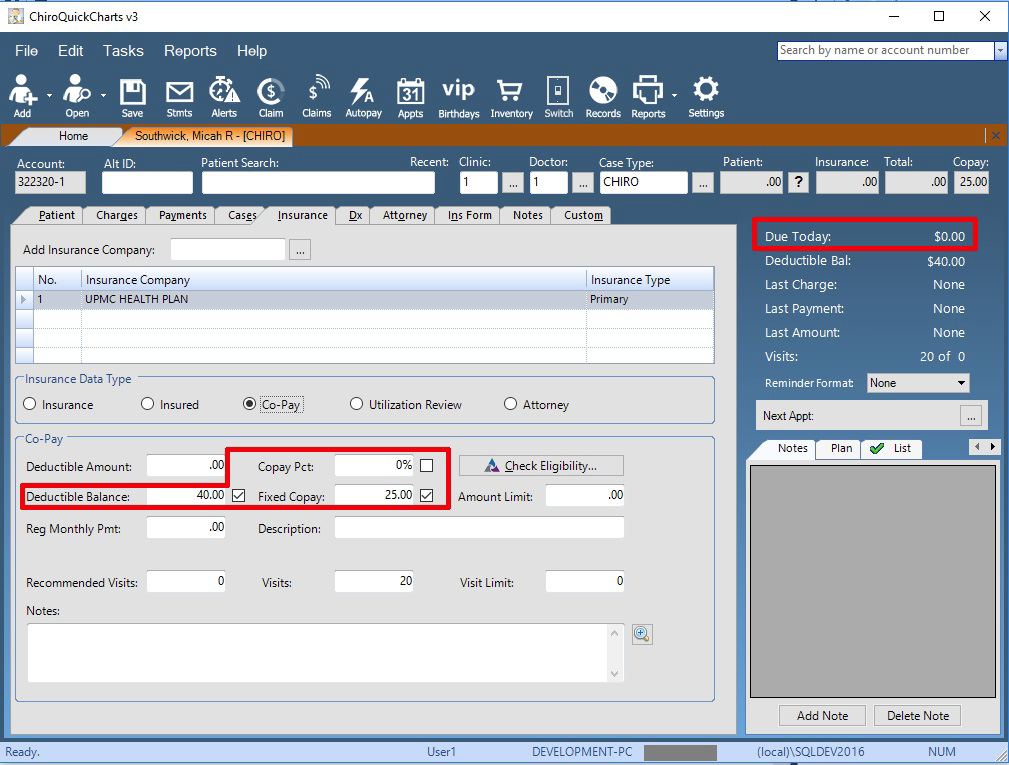
The Due Today feature is fully responsive. Checking/unchecking a checkbox or changing a value will automatically recalculate the due today amount.
There are three different amounts that can be included in the Due Today calculation:
• Copay Pct
• Fixed Copay
• Deductible Balance
When the Copay Pct option is checked, the user-entered percentage of all unadjudicated insurance charges up to and including their sum will be included in the Due Today amount.
When the Fixed Copay option is checked, the user-entered amount will be included in the Due Today amount up to and including the sum of unadjudicated insurance charges.
When the Deductible Balance option is checked, the Due Today amount will include the amount of the remaining Deductible balance up to and including the total of unadjudicated insurance charges.
If any combination of the Copay checkboxes and Deductible Balance checkbox are used at the same time, the Due Today calculation will use either the sum of any calculated Copay due or the Deductible Balance amount, (whichever is greater.)
The exact Due Today amount is calculated as the sum of the estimated amount of the patient responsibility of any insurance charges, plus any patient charges for today, plus any existing patient balance.
If a user clicks on the display text of the Due Today on the patient’s file, they will be shown a break down window (examples below).
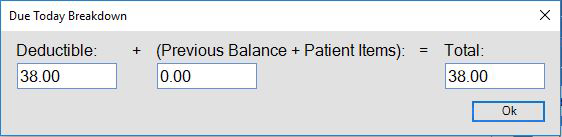
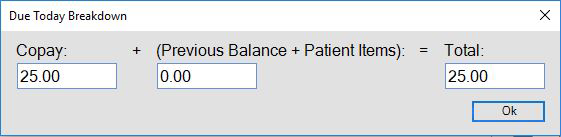
The feature includes a quick break-down display that will automatically tell the customer the split of the amount of Copay/Deductible that is owed for today’s visit and the sum of patient-based charges and previous patient balance.
An additional feature when the Deductible Balance checkbox is checked, is that any Deductible (ActionType 1) transaction lines added will automatically decrease the amount in the Deductible balance by the amount of the transaction. Likewise, any Deductible (ActionType 1) transaction lines that are deleted will automatically increase the amount in the Deductible balance by the amount of the transaction.
0 Comments