
With PM you are able to customize the content of Email and Text based appointment reminders, as well as change the time messages are sent.
To edit the Content of an Email Reminder -
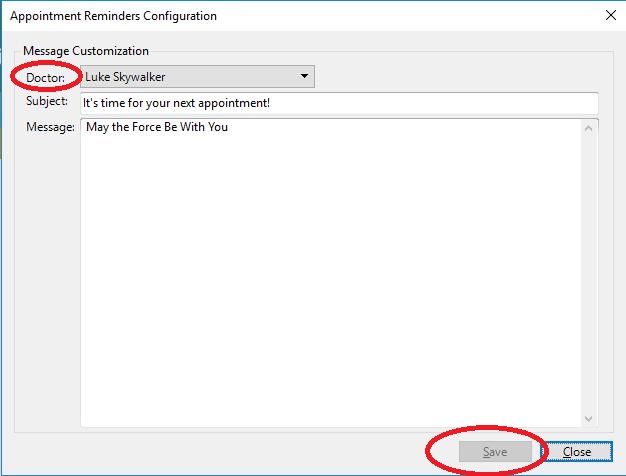
Choose Configure Reminders/Televox from the top edge of the Appointment Calendar.

Select the Dr whose message you wish to edit, then enter the Subject and Body of the reminder. Press Save when complete
To edit the content of a Text Reminder and send times for Email and Texts -
Choose Settings from the top edge of the Appointment Calendar then choose Reminders from the Category list on the left.
From this screen you can set the contents of the Text based reminder, as well as the time reminders are sent.
The maximum number of Characters for the text is 160. In the example, {doctor} and {apptdate} will be replaced with the information unique to each appointment. When the Message is sent to the Patient it becomes "Reminder: Your appointment with Dr. Skywalker is scheduled for 1/1/2018".
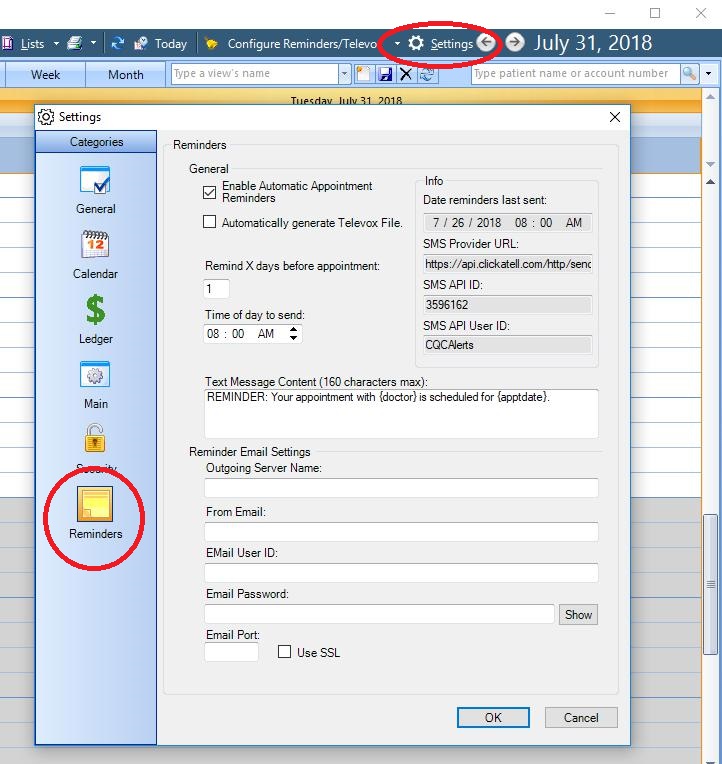
Remind X days before appointment tells the system how far in advance to send reminders. For instance - 1 means appointments sent out on Monday will be for Tuesday appointments. 2 means reminders sent on Monday will be for Wednesday appointments. 3 = Thurs...etc.
Time of Day to send tells the system when to send appointments.
0 Comments