
To show that your practice participates with insurance carriers, you accept assignment for those carriers. You can accomplish this few ways depending on your practice:
- If you accept assignment for every insurance then make sure the ‘Accept Assignment’ box is checked under the Setup tab when generating claims. Make sure to click the Save Settings button at the bottom so you don’t have to remember it each time. This setting is saved separately under both the ‘Claim’ and ‘Claims’ buttons on the menu bar.
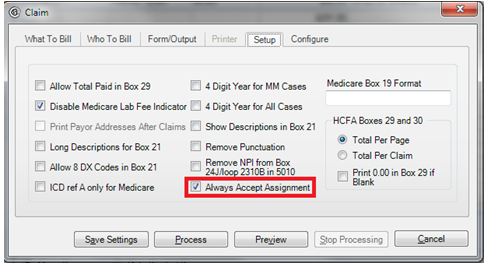
2. If you only accept assignment for a few insurance carriers then check the box in each insurance carrier record.
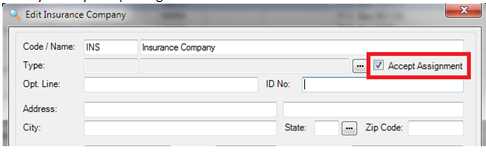
3. If you accept assignment for some carriers but not all you should leave the claims option "Always Accept Assignment" off, and let the Insurance Carriers setting control it. The system will use the setting from the carrier unless that option is checked it will override and force them all to True. Please contact tech support if you have any questions or need help globally changing the setting on all carriers.
0 Comments